Let me paint a picture you might know too well. It's the 14th of the month. You're hunched over a spreadsheet at 11 PM, coffee cold, trying to match receipts from three months ago to bank transactions that just say "POS Purchase." Your brain is fuzzy. You're one misplaced decimal away from tears. You swear this quarterly reporting will kill you.
I ran my freelance business like this for two years. I called it "doing the books." Really, it was an archaeological dig through my own financial chaos. The stress was a constant background hum.
Then I met a retired CFO at a coffee shop. I was venting. He listened and said, "You don't have an accounting problem. You have a process problem. You're trying to fix a mess instead of preventing one."
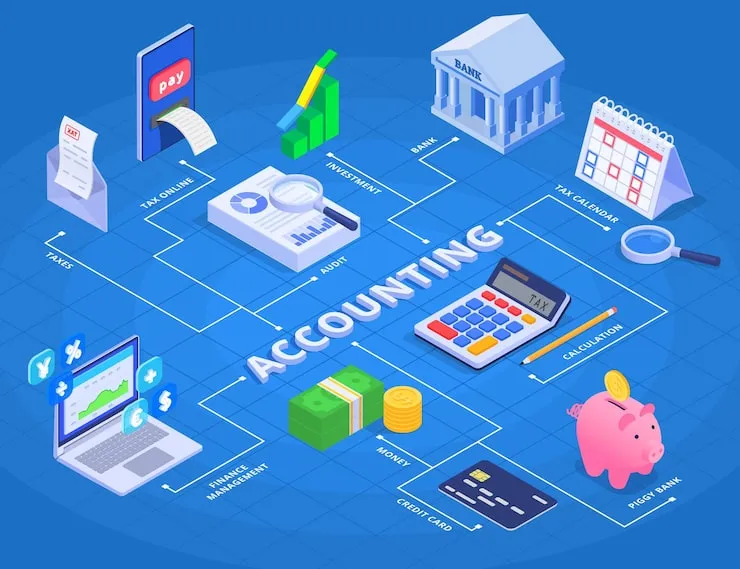
He sketched a simple flowchart on a napkin. It wasn't about double-entry bookkeeping. It was about the flow of information. That napkin changed everything.
This isn't about learning more accounting rules. It's about designing a system where your finances organize themselves, almost automatically. Let's build that system.
The Core Mindset Shift: From Bookkeeper to Air Traffic Controller
Stop seeing yourself as the person who records history. Start seeing yourself as the person who directs traffic.
Money, invoices, and receipts are like planes. They need clear runways, standard procedures, and a schedule to avoid pile-ups. Your job isn't to chase each plane with a notepad after it lands. Your job is to build the control tower so they land smoothly, in order, all day long.
The goal is to make "closing the books" a 30-minute task, not a 30-hour nightmare.
The Napkin Sketch: The "Touch It Once" Financial Hub
Here was the napkin idea: All money-related information must flow into one single hub, and it must happen immediately.
In practice, this means the moment a financial event occurs, you record it in its final resting place. You don't let it sit in an inbox, a pocket, or your brain.
Here’s the game-changing process improvement example, built on that principle.
The Old, Broken Process (The "Monthly Dig")
- Spend money/get paid.
- Throw receipt in drawer/invoice in "Sent" folder.
- Feel dread build for 29 days.
- Spend a weekend searching, scanning, guessing, and manually entering everything into a spreadsheet.
- Reconcile (panic when it doesn't match).
- File stuff away, exhausted. Repeat.
The New, Smooth Process (The "Daily 5-Minute Touch")
Hub: A cloud accounting app (like QuickBooks Online, FreshBooks, or even a well-designed Google Sheet).
Rule: Every financial event gets logged into the hub the day it happens. Touch it once.
Building Your Flow: The Three Channels
You have three types of traffic. We'll build a runway for each.
Channel 1: Money Coming In (Sales & Invoices)
The Old Way: Make a sale, send an invoice from your email, hope you remember to mark it paid later.
The New Flow:
- Create the invoice inside your accounting hub. (Apps let you do this easily and email it directly).
- The hub automatically records it as "Accounts Receivable."
- When payment arrives (via Stripe, PayPal, bank transfer), you or a rule matches it to that open invoice in the hub.
- The hub moves it from "Receivable" to "Revenue" and logs the bank deposit.
The Improvement: You never have to ask, "Did Client X pay?" You open the hub. Their invoice is either "Open" or "Paid." Your cash flow is visible in real-time.
Channel 2: Money Going Out (Expenses & Purchases)
The Old Way: Buy something, stuff receipt in wallet, lose it, guess the amount a month later.
The New Flow:
- The 60-Second Rule: The moment you finish a business purchase (online or in-person), you deal with the receipt immediately.
- Digital Receipts (Best): Use a business debit/credit card. The transaction appears in your bank feed. Use a receipt-scanning app (like Receipts by Wave or Hubdoc) that takes a photo and extracts the data. It auto-feeds into your accounting hub, already categorized.
- Paper Receipts (Good): Have a dedicated envelope in your bag labeled "RECEIPTS." Once a day, empty it. Take 2 minutes to snap photos with your scanning app. Toss the paper. The data flows to your hub.
The Improvement: No more shoeboxes. No more deduction guessing at tax time. Your expense log is always current.
Channel 3: The Bank Connection (The Magic Link)
This is the linchpin. Connect your business bank account/credit card to your accounting hub (most apps do this securely via read-only API).
What it does: Every day, your transactions flow automatically into the hub. Your job is no longer data entry. Your job is categorization and matching.
- The $29.99 to "AWS" gets auto-categorized as "Software."
- The $150 deposit from "Stripe" gets matched to the open invoice for Client Y.
You're just confirming and connecting dots, not writing a novel from scratch.
Putting It All Together: The "Close-Out" That's Not a Crisis
Let's see how this flows at month-end. It's the 30th.
Old You: Blocks out Saturday. Panics.
New You (with the new process):
- Log into your hub. The bank feed is already there.
- Click "Reconcile." The app shows you all bank transactions. It also shows you all the invoices and expenses you've already logged (from your daily 5-minute touches).
- You simply check them off as they match. "Yes, this $75 bank fee matches the $75 fee I logged on the 5th."
- The software flags any orphaned transactions (a bank entry with no matching log). You handle 2-3 of these—maybe a fee you missed. You categorize it now.
- Click "Finish Reconciliation." Your books are done. Profit & Loss and Balance Sheet update instantly.
- Time spent: 20 minutes.
This is the game-changer. The work was done in tiny, painless bits over 30 days. The "closing" is just a final, quick review.
Your Tech Stack (Keep It Stupid Simple)
You don't need an enterprise system.
- Hub (Essential): A cloud accounting app. QuickBooks Online Simple Start or FreshBooks are great for service businesses. Wave Apps is 100% free and fantastic for starters.
- Scanner (Optional but Helpful): The mobile app that comes with your accounting software, or a dedicated one like Adobe Scan.
- Payment Processor Link: Connect Stripe/PayPal/Square to your hub so sales auto-record.
- Separate Bank Account: This isn't software, but it's the most important tool. One account for all business transactions. No mixing. This makes the automated feed pure.
Your First Week Implementation Plan
Don't overhaul everything at once.
- Day 1: Open an account with a cloud accounting app (start with Wave if you want zero cost). Connect your business bank feed.
- Day 2: Enter all unpaid invoices (what people owe you). Start creating any new invoices from within the app.
- Day 3: Practice the "60-Second Rule" with one expense. Snap the receipt with the app and categorize it.
- Day 4: Go through last month's bank statement. Use the "Add Transaction" feature to quickly log and categorize old transactions to clean the slate. (This is your one-time catch-up).
- Day 5: Do your first "mini-reconciliation." Match last week's automated bank feed items to the receipts/invoices you logged.
By week's end, you'll have a living system. The goal for month two is simply to be consistent with the daily touch.
Why This Works: It Fights Friction with Flow
The old process failed because it had massive friction: finding, remembering, deciphering, batch-processing. Our brains hate that.
The new process minimizes friction. Snap a pic. Click "send invoice" from the app. The hard work (data entry) is automated. The human work (categorization, decision-making) is done in context, when the details are fresh.
You stop being an archaeologist and start being a director. You see your financial story unfold in real-time, which means you can make smart decisions—like noticing a client is always late and requires upfront payment, or that a software subscription isn't worth its cost.
That's the real win. It's not just tidy books. It's clarity, control, and the end of the monthly financial panic attack.
FAQs: Accounting Process Improvement
I'm not a tech person. Is this too complicated to set up?
The setup is the one-time hurdle. These apps are designed for non-accountants. They have setup checklists and help guides. Spend one focused hour following their "get started" tutorial. The daily using of it is far simpler than your current monthly scramble.
What if I mostly deal with cash?
The principle is the same: touch it once. The moment you receive a cash payment, open your accounting app on your phone and record a "Sales Receipt." The moment you spend cash, get a receipt and immediately log it as an "Expense" in the app. The hub is still your single source of truth.
Is my financial data safe in the cloud?
Reputable cloud accounting apps (QuickBooks, FreshBooks, Xero) use bank-level encryption (256-bit SSL) and have security teams dedicated to protection. They are arguably more secure than a laptop that could be stolen or a filing cabinet that could burn. Always use a strong, unique password and two-factor authentication.
How do I handle my personal expenses that get mixed in?
If you use a personal card for a business meal, the process is identical: snap the receipt, log it in the hub as a "Business Expense," and categorize it. When you reconcile, you'll see the personal transaction come through the bank feed. You categorize it as "Owner's Draw" or "Shareholder Loan" (for corps) or just "Personal" to exclude it from business expenses. This is why a separate business card is a huge time-saver.
What's the one sign my process is broken?
If "closing the books" is a special, dreaded event that requires clearing your schedule, your process is broken. In a smooth system, closing is a trivial, quick review because the work has been done continuously.
Can I do this with just a spreadsheet?
You can apply the principle (touch it once, daily log) to a spreadsheet, but you lose the automation magic (bank feeds, auto-categorization, receipt scanning). It will still be manual entry, just more frequent. For the price of a few coffees a month, the time saved by an app is almost always worth it.