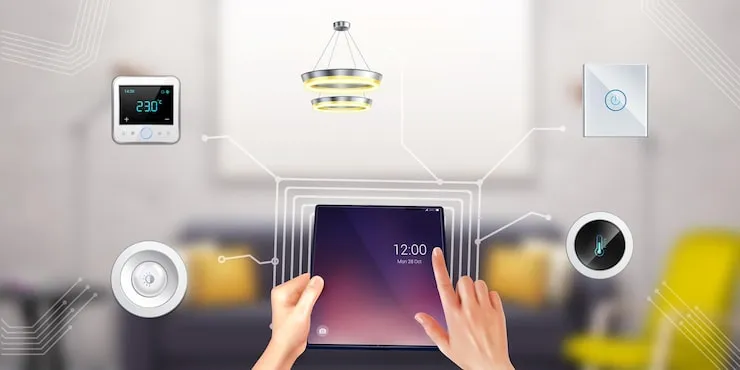
So you want a smart home. You buy a "smart" light bulb. Then a video doorbell. Then a thermostat. Suddenly, you have three apps, nothing talks to each other, and your WiFi is slower than a dial-up modem. What was meant to simplify your life now feels like a part-time IT job.
I've been in that tech support nightmare. The secret to a smooth smart home isn't buying the coolest gadget. It's about building a system, not a collection of gadgets. It starts with a plan, centered on one crucial question: "What actually annoys me daily that technology can fix?"
Let's build your system from the ground up, the right way.
The Foundation - Choose Your Ecosystem FIRST
This is the most critical decision. Your ecosystem hub is the brain that will (ideally) control everything. Don't buy a single device until you choose this.
You have three main paths:
- The Voice Assistant Path (Easiest Start): Choose between Amazon Alexa (via Echo devices) or Google Assistant (via Nest speakers). Your hub is the speaker. This is great for beginners focused on voice control, music, and basic device control.
- The Apple-Centric Path (Privacy & Simplicity): Apple HomeKit. Your hub is an Apple TV, HomePod, or iPad left at home. If your household is all-in on iPhones/Macs and you value privacy and a slick, integrated interface, this is your lane. Devices must be "HomeKit-certified," which often means higher prices but easier setup.
- The Power User Path (Reliability & Advanced Automation): Samsung SmartThings Hub or Home Assistant (open-source). These are dedicated hubs that use protocols like Zigbee and Z-Wave, which are more reliable and don't clog your WiFi. This is for serious automation (e.g., "If motion is detected after sunset, turn on pathway lights for 5 minutes").
My Advice for Most People: Start with Alexa or Google if you're new. It's low-cost and flexible. If you get serious and hit limits (like unreliable WiFi devices), add a SmartThings Hub later—it can work with your voice assistants.
Device Categories - Build in Phases
Tackle one category at a time. Here’s a logical order:
Phase 1: Lighting & Plugs (Instant Wins)
- Devices: Smart bulbs (Philips Hue, Lifx), Smart plugs (TP-Link Kasa, Wemo).
- Why First: They're cheap, easy to install, and give you immediate benefits: voice-controlled lights, scheduled lamps, energy monitoring on plugs.
- Tip: For multi-bulb fixtures (like a ceiling fan), use a smart switch (like a Lutron Caséta) instead of individual bulbs. It's simpler and cheaper.
Phase 2: Security & Awareness
- Devices: Video doorbell (Ring, Google Nest), indoor/outdoor cameras, smart locks (Schlage, Yale).
- Why Second: They provide peace of mind. Start with a video doorbell—it's incredibly useful.
- Key Consideration: Check for subscription fees for video recording (e.g., Ring Protect, Nest Aware). Factor that into your long-term cost.
Phase 3: Climate & Environment
- Devices: Smart thermostat (Nest, Ecobee), smart sensors (for temperature, humidity, leak detection).
- Why Third: A smart thermostat can pay for itself in energy savings. Sensors can trigger alerts or actions (e.g., leak sensor shuts off a smart water valve).
Phase 4: Advanced Automation & Entertainment
- Devices: Smart blinds/shades, robot vacuums, multi-room audio systems (Sonos), AV receivers.
- Why Last: These are higher-cost, higher-complexity items. Get your core system stable first.
The Golden Rule of Compatibility (Avoid App Hell)
Before you buy any device, check this box: "Works with [Your Chosen Ecosystem]"
- Look for the logo on the box: "Works with Alexa," "Google Assistant built-in," or the "Works with Apple Home" badge.
- The ideal is for all devices to connect directly to your chosen hub/app. This means you control everything from one single app (the Alexa app, Google Home app, or Apple Home app).
- Avoid "Bridge" or "Hub" Hell: Some brands (like Philips Hue) require their own proprietary bridge/hub. This isn't always bad—it can make their devices more reliable. But too many proprietary hubs equals too many points of failure and plugs taken up. Consolidate where possible.
Installation & Setup - The Smart Order
- Set Up Your Hub/Brain First: Unbox your Echo, Google Nest, or Apple TV hub. Connect it to your WiFi and log into its app. Get it working.
- Strengthen Your Network: Your WiFi is your home's nervous system.
- Get a Good Router: Consider a mesh WiFi system (like Google Nest Wifi, Eero) for strong, consistent coverage everywhere.
- Create a Separate Network (IoT VLAN): Advanced but highly recommended for security. This puts all your smart devices on a separate network from your personal laptops/phones.
- Add Devices ONE BY ONE: Follow the manufacturer's app to connect each device to your WiFi. Then, immediately open your hub's app (Alexa/Google/Apple) and "Add Device." It should discover it. Name it something clear and logical: "Kitchen Light," not "Light 1."
- Create Rooms/Groups: In your hub app, assign each device to a Room (e.g., Kitchen, Bedroom). This lets you say, "Alexa, turn off the Kitchen lights."
- Start with Simple Automations (Routines/Scenes):
- "Good Morning": At 7 AM, turn on the bedroom lights to 50%, read out the weather.
- "Goodnight": When you say "Goodnight," lock the front door, turn off all lights, and set the thermostat to 68°F.
- Start here. They're foolproof and life-changing.
What to Consider: The Reality Check
- Privacy: Every microphone and camera is a potential privacy concern. Research brands' data policies. Mute microphone buttons are your friend. For cameras, point them away from private spaces.
- Security: Change default passwords! Use strong, unique passwords for your router and smart home accounts. Enable two-factor authentication (2FA) wherever possible. Isolated IoT networks are a major security upgrade.
- Reliability vs. Complexity: The more complex your automations ("If this, then that, unless this other thing..."), the more likely they are to fail. Keep critical functions (like door locks) simple and reliable.
- The "Walled Garden": Committing to Apple HomeKit or Google/Alexa means some cool devices might not work with your system. You trade choice for simplicity. Decide what's more important to you.
- Your Internet Connection: If your internet goes down, so will many of your smart functions (especially cloud-based ones). Local control (via a hub like SmartThings or Home Assistant) keeps basic automations running.
A smart home should disappear into the background, working silently to make your life easier. By starting with a brain (your hub), choosing compatible devices, and building slowly, you’ll create a system that feels like magic—not a part-time job.