



Best tech tips for using Android phones safely include setting strong PIN or fingerprint locks, keeping OS and apps updated weekly, downloading only from Play Store with Play Protect on, turning off Wi-Fi and Bluetooth on public networks like railway stations, enabling two-factor authentication for UPI and Gmail, checking app permissions monthly, avoiding strange links or OTP calls from scammers, installing antivirus like Quick Heal, backing up data to Google Drive, using Find My Device for lost phones at Delhi Metro, restarting daily, and hiding sensitive notifications.
For Indian users follow mobile phone safety tips such as original chargers, SIM PIN locks, and no rooting to secure your phone from hackers amid rising cyber crimes. These steps answer which of the following can help protect your Android best without complex setups.
Why Android Phone Safety Matters in India Today?
In India today more than 800 million people use Android phones for everything from booking trains to sending money. Cyber crimes went up by over 20 percent last year with UPI scams leading the list.
Hackers target crowded places like markets and buses where phones get left behind or Wi-Fi tempts quick logins. Banks report thousands of cases every month where weak settings let thieves empty accounts. Simple habits can stop this because most attacks come from easy guesses not magic tricks.
Read More: Importance of Data Protection in India: 2026 Guide
Set a Strong Lock on Your Phone
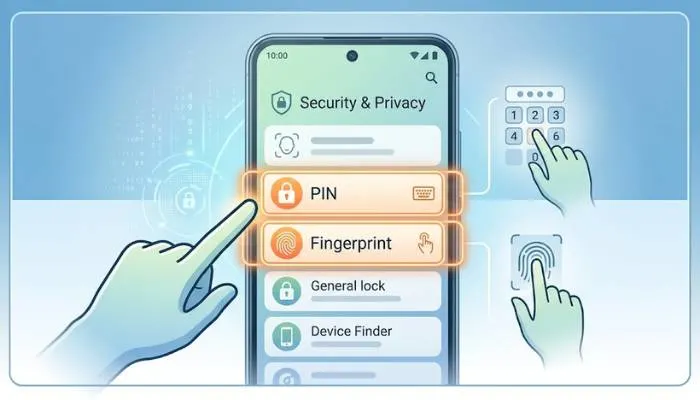
Start by locking your Android phone well. Open Settings then go to Security and choose a PIN with six numbers at least. Pick numbers not like 123456 or your birthday because people guess those fast.
Pattern locks look fun but leave marks on screen that others see. Use fingerprint or face unlock if your phone allows it. They open quick and stop anyone picking up your phone at the market.
Set auto-lock for one minute so screen shuts if you forget it on a bus. This hides your chats from strangers.
Keep Your Phone Updated Always
Companies send phone updates to close doors hackers use. With Samsung Xiaomi Realme all over India check yours every week.
In Settings find System and tap Check for Updates. Do them even if slow because old phones let bad software in. A few months back a problem in old Android took photos from phones.
Update apps too. Play Store profile then Manage Apps and Device. Do all when on home Wi-Fi. This keeps Google Pay safe from new bad tricks.
Download Apps Only from Play Store
Skip apps from websites or WhatsApp free game links. During Diwali fake recharge offers spread everywhere in India.
Use only Google Play Store since they check first. Read Indian user reviews and see what access it wants. Torch app asking for contacts? No way delete it.
Turn on Play Protect in Play Store. It looks for danger and tells you. My cousin skipped a virus from a cricket app link like this.
Turn Off Wi-Fi and Bluetooth When Not Needed
Wi-Fi at malls or airports in Mumbai Bangalore carries risks. Hackers grab bank details when you shop.
Settings Network and Internet turn off Wi-Fi auto-connect. Forget networks you do not know. Bluetooth off unless earphones because close attackers link in.
Use mobile data for bank checks. Home or office Wi-Fi only if password strong.
Use Two-Factor Authentication Everywhere
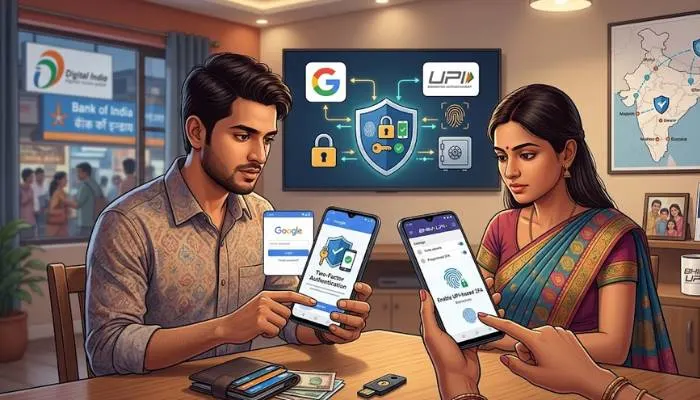
- Strong PIN not enough add more guard. Two-factor sends code to phone on new login.
- Gmail Facebook settings turn it on. Google Authenticator better than SMS since SIM tricks happen in India.
- UPI like Google Pay asks PIN each time. Tell no one even bank callers.
Check App Permissions Regularly
- Apps take too much sometimes. Weather one no need camera or messages.
- Settings Apps pick each see permissions. Turn off extra. Android shows unused ones now.
- Check monthly after new apps for IPL or elections. Stops apps watching calls or where you go.
Avoid Clicking Strange Links or Calls
- Messages pretend bank alert or prize. Click here account locked fake.
- Check bank app yourself. Scammers use Hindi now to trick more.
- Unknown OTP call? Hang up call official number from site. Block spam in Phone settings.
Install a Good Security App
- Play Protect good but add Quick Heal McAfee from Play Store. They find more threats.
- Scan weekly real-time on. Free ones enough. Monsoon wet market chargers bring viruses these stop them.
Back Up Your Data Often
Phone gone or broken photos contacts lost. Google Drive Photos back up on Wi-Fi. Settings System Backup turn on. SD card too. Test bring back once.
Enable Find My Device Feature
- Lost at Delhi Metro? Find My Device tracks it.
- Settings Security Find My Device on. Other phone or computer android.com/find ring lock erase.
- Share location family only trusted way. Found my old one near Chandni Chowk this way.
Restart Your Phone Every Day
Restart clears junk where bad stuff hides. Before bed after public charge. Power button Restart 30 seconds keeps phone clean.
Hide Sensitive Notifications
Lock screen no show OTP messages. Settings Notifications sensitive off. Family events no peek at private talks.
How Do I Secure My Phone from Hackers?
Secure phone from hackers with locks updates no public Wi-Fi check links. India cyber crimes up 20% last year these block most. VPN from Play Store for strange networks.
Hackers hit UPI hard. No pop-up BHIM verify. Report cybercrime.gov.in if wrong.
Mobile Phone Safety Tips for Daily Use
- Safety tips lock SIM PIN ##4636## or Settings. Stops bad use if SIM swap.
- Original cables only street fake ones bad. Long calls speakerphone away from body chat mum safe.
You May Also Read: Latest Security Technology Products Powered By AI & Automation
Which of the Following Can Help Protect Your Android?
PIN updates Play Store antivirus protect Android best. Biometrics 2FA more. No root no unknown.
| Protection Step | Why It Helps | How Often to Check |
|---|
| Protection Step | Why It Helps | How Often to Check |
|---|---|---|
| Strong PIN/Fingerprint | Stops physical access | Set once test daily |
| OS Updates | Fixes hacker holes | Weekly |
| Play Protect | Scans bad apps | Always on |
| No Public Wi-Fi | Blocks data theft | Every time out |
| 2FA | Extra login code | On all accounts |
Extra Tips for Indian Users
- Crowd trains app lock bank apps. Samsung Secure Folder others AppLock Play Store.
- Kids Family Link screen time. Festivals scam SMS lucky draw watch.
- Battery drain uninstall heavy. Storage under 80%.
Conclusion
These best tech tips for using Android phones safely make a big difference in your daily life. You spend time on them now to avoid headaches later like losing money from UPI or private photos. Pick two steps today such as strong lock and updates then add more each week.
Tell your family in Delhi or Mumbai about mobile phone safety tips so everyone stays protected. Your phone handles bank work chats and memories keep it safe and use it with peace.
FAQs
How do I secure my phone from hackers?
Set a strong PIN update your phone often and skip public Wi-Fi at stations. Turn on two-factor for apps and check links before tap. In India hackers target UPI so never share OTPs with callers.
What are simple mobile phone safety tips for beginners?
Lock your SIM with PIN restart daily and back up to Google Drive. Use only Play Store apps and hide notifications on lock screen. Charge with real cables not street ones during rains.
Which of the following can help protect your Android best?
Fingerprint lock OS updates and Play Protect top the list for Android safety. Add antivirus like Quick Heal and no unknown app downloads. These stop most common threats in India.
Why turn off Bluetooth for Android phone safety?
Bluetooth lets nearby people connect if on so switch off when not using earphones. Hackers in crowds scan for open ones to send bad files. Check it weekly in quick settings.
How often should I check app permissions on Android?
Look at permissions every month in Settings Apps. Turn off camera or location for apps that do not need them like weather ones. This stops extra spying on your daily moves.










