



Cloud bills keep growing. Many companies waste money without knowing it. Up to 49% say over a quarter of their cloud spend is wasted. That is where cloud cost optimization strategies come in. Not just cutting costs. Matching spend to results.
Start with visibility tag everything. Rightsize what is too big shut down dev servers at night. Use Reserved Instances for steady work. Spot for batch jobs. Track cost per customer. This guide covers what works, the tools to use, and how much you can save.
What Is Cloud Cost Optimization?
Cloud cost optimization means getting the most value from your cloud investment. It is not just about cutting costs. It is about matching spend to business outcomes. The FinOps Foundation defines it as enabling organizations to get maximum business value from cloud spend, which requires shared ownership of cost data across engineering, finance, and business teams .
Traditional cost metrics tell you what you spent. They do not tell you what you got for it. Modern optimization ties every dollar to a business dimension—cost per customer, cost per transaction, cost per feature . That shift changes the conversation from "reduce spend" to "improve efficiency."
Read More: Latest Developments in Quantum Computing 2026: India Trends
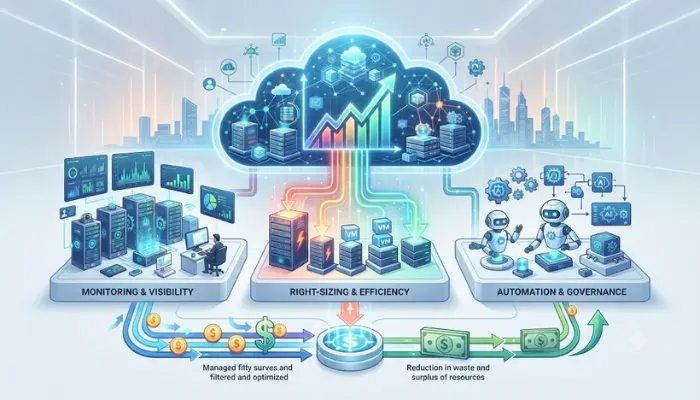
Cloud Cost Optimization Strategies in Cloud Computing
1. Start with Visibility and Allocation
You cannot optimize what you cannot see. Effective cost allocation means attributing spend to the teams, products, features, or customers generating it, not just viewing totals by service or account . When an engineering team can see their cloud cost per week, and how it changes when they launch a new feature, cost becomes part of the design conversation rather than a surprise at month end .
A consistent tagging strategy is essential. Enforce tagging at deployment to prevent attribution gaps. Every resource should carry team, environment, application, and cost center tags at minimum .
2. Implement Continuous Rightsizing
Rightsizing should be an ongoing operational activity, not an annual review. Many workloads run on instances that are over-provisioned or underutilized. Effective approaches include monthly utilization reviews, thresholds such as CPU below 30% or memory below 40% for sustained periods, and removal of unused snapshots and volumes .
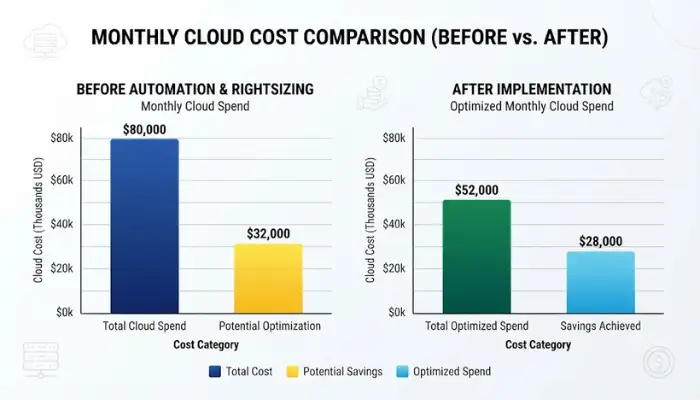
Research shows that combining rightsizing, auto-scaling, reserved instances, spot instances, and storage tiering reduced total cloud expenditure by 28% in an empirical study of enterprise workloads. Compute and idle resource spending dropped by 32%, and mean utilization improved by 45% .
3. Automate Non-Production Shutdowns
This is the fastest, lowest-risk cost reduction available for most organizations. Non-production environments running off-hours and weekends with no engineering activity are pure waste . Azure Virtual Machine Automatic Shutdown handles this automatically . Creating automated shutdown schedules for development environments takes hours to implement and generates immediate savings .
4. Cover Stable Workloads with Commitments
Any workload running consistently at predictable utilization for more than a few months is a candidate for Reserved Instances or Savings Plans coverage. Savings can reach up to 72% versus on-demand pricing . Azure Reserved VM Instances deliver up to 72% off pay-as-you-go for one- or three-year commitments. Azure Savings Plans offer up to 65% off with more flexibility across instance types and regions .
The key is to rightsize before committing. Locking into capacity you will end up shutting down or replacing wastes money .
5. Use Spot Instances for Interruptible Workloads
Spot instances provide access to spare cloud capacity at discounts up to 90% off on-demand rates . They work best for batch jobs, rendering, dev/test, and advanced analytics workloads that can tolerate interruption.
For AI workloads, using lower-cost GPU types for development and reserving premium instances for production training can reduce costs by 50-70% .
6. Track Cost Per Unit, Not Just Total Spend
Total cloud spend increasing is not necessarily a problem it may mean the business is growing. The metric that matters is cost per unit of business value . Cost per customer, cost per transaction, cost per feature, and cloud efficiency rate all provide actionable signals. A cloud efficiency rate above 70% indicates strong cost discipline; below 50% suggests meaningful optimization opportunities .
For AI workloads, measuring cost per AI feature, cost per user, and cost per successful outcome helps determine whether AI initiatives are profitable at scale .
Cloud Cost Optimization Tools
Native Cloud Provider Tools (Free to Start)
- AWS: Cost Explorer, Budgets, Compute Optimizer, and Cost Anomaly Detection. These are free, deeply integrated, and sufficient for basic visibility and rightsizing recommendations. Their structural limitation is that they show spend by AWS service and account, not by business dimension .
- Azure: Azure Cost Management + Billing, Azure Advisor (Cost tab), and Azure Policy. Most organizations do not use 70% of what is already available before reaching for third-party tools .
- GCP: Recommender and Cloud Billing reports provide native rightsizing and cost visibility.
You May Also Read: Benefits Of Cloud Computing For Small Businesses

Third-Party FinOps Platforms
For organizations needing cross-cloud visibility and business-level attribution, several platforms lead the market.
| Tool | Best For | Key Strength |
|---|---|---|
| Microsoft | Overall leader | Top-ranked in ISG Buyers Guide for FinOps Platforms |
| Datadog | Observability + cost | Strong platform experience, real-time analytics |
| AWS | AWS-native organizations | Deep integration with AWS services |
| CloudZero | Unit economics | Cost per customer, product, feature, or team |
| Vantage | Modern UX | Generous free tier, strong Azure and AWS coverage |
| Cloudability | Multi-cloud enterprises | Mature, legacy leader for multi-cloud governance |
| CloudHealth | Enterprise governance | Multi-cloud with governance focus |
| Flexera One | Broader IT spend | Includes SaaS spend management |
The honest take from Microsoft's own Q&A: tools surface recommendations—they do not optimize. The bottleneck for most organizations is having the time and authority to action what Advisor already flags . Pick the tool that matches who actually owns implementation in your organization.
The Bottom Line
Cloud cost optimization is not a one-time project. It is a continuous discipline. Start with visibility. Enforce tagging. Rightsize regularly. Automate non-production shutdowns. Commit for stable workloads. And measure cost per unit of business value, not just total spend.
The tools are there. Native provider tools are free and cover the basics. Third-party platforms add cross-cloud attribution and unit economics. But tools do not optimize—people do. The bottleneck is having the time and authority to act on recommendations. Pick the tool that matches who owns implementation. Then build the governance to make savings last.
FAQs
1. What is cloud cost optimization?
Getting more value from what you spend. Not just cutting. Matching spend to results. Every dollar does something.
2. Main ways to cut costs?
Rightsize resources. Shut down dev environments at night. Use Reserved Instances for steady work. Use Spot for batch jobs. Tier your storage. Track cost per customer, not just total.
3. Rightsizing vs auto-scaling?
Rightsizing fixes resource size to match need. Auto-scaling adds or removes capacity as demand moves. Both cut waste. One is periodic. The other is live.
4. Best free tools?
AWS Cost Explorer and Compute Optimizer. Azure Cost Management and Advisor. GCP Recommender. Free. Show where money goes. Third-party tools add cross-cloud views but cost money.
5. How much can I save?
20 to 40 percent is normal. One study found 28 percent from rightsizing, auto-scaling, and commitments together. A database company cut 40 percent with Kubernetes and automated FinOps.
6. What is FinOps?
Finance and engineering working together on cloud spend. Shared numbers. Everyone sees the same data. Cost gets considered during design, not after the bill lands.
7. What is unit economics?
Cost per customer. Cost per transaction. Cost per feature. Cost per AI outcome. Tells you if spend is delivering value. Total spend rising is fine if revenue rises faster.
8. Where do companies waste most?
Three spots. Instances running below 30 percent CPU. Dev environments running nights and weekends. Unused snapshots and volumes sitting idle. Fix these three. Cut a lot of waste fast.